Hatch Restore 3 Sunrise Alarm Clock Review: Real User Experience After 3 Months
Introduction
I've been using the Hatch Restore 3 as my bedside alarm and sleep companion for three months now. I bought it because I wanted a gentler way to wake up, better control over my evening wind-down routine, and a single device that could replace the jammed drawer of sleep apps on my phone. In this long-form review I’ll share exactly what I liked, what annoyed me, and whether the Restore 3 earned a permanent place on my nightstand.
Why I chose the Restore 3
Before buying, I was already familiar with sunrise alarm concepts and Hatch’s previous models. What sold me was the promise of naturalistic light transitions, a broader set of sleep/wake programming options, and a cleaner bedside experience without reaching for my phone at night. I wanted something that would help me fall asleep without staring at a screen and wake me up without that jolt of a buzzer.
Setup and first impressions
Setup was straightforward. The Restore 3 arrived with a single power cable (no battery operation for overnight use in my unit) and a compact instruction sheet. I downloaded the Hatch app, created an account, and followed the pairing flow. The app walked me through defining my typical sleep and wake windows, selecting sunrise duration and the soundscapes I wanted.
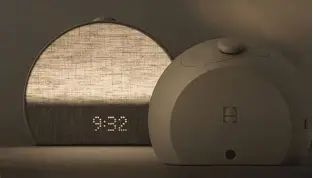
First impressions: the unit looks more refined than the older models. The finish on mine is matte, and the light diffuser is pleasantly soft. It’s the size of a small alarm clock — not tiny, but not bulky either — and it doesn’t dominate my nightstand. The touch controls are responsive but have a small learning curve; I kept tapping too hard the first few nights. Overall I appreciated the immediate feeling of a coherent product experience between hardware and app.
Daily use — waking up
In my experience, the sunrise simulation is the Restore 3’s core strength. I set a 30-minute sunrise on weekdays and 45 minutes on weekends. What I found was that the light ramps up smoothly from a warm amber to a cool white, gently nudging me awake. On most days I wake before the final buzzer because the light lifts my mood and reduces that groggy feeling that sudden alarms cause.
Volume and the sound library: the device offers both natural sounds (ocean, birdsong, chimes) and gentle tones. I mixed a soft chime with a light wind sound; combined with the sunrise, it felt less like an alarm and more like a natural cue. The speaker is not hi-fi — it lacks deep bass and the soundstage is narrow — but it’s perfectly adequate for voice cues and ambient sounds at bedside volume.
On mornings when I need to be up immediately (early flight days), I still found myself tapping the snooze a time or two. The snooze behavior is predictable, but I wish there were more customization options for repeated snoozes without reopening the app.
Sleep and wind-down features
I used the Restore 3 nightly wind-down for the same three-month stretch. I set a 20-minute "sunset" sequence before bed where the light slowly dims to a warm amber, paired with a low-volume rain sound. What I noticed was twofold: the dimming light helped signal bedtime, and the routine made it easier to avoid checking my phone in those last minutes before sleep.
One caveat: if you prefer an absolute blackout for sleeping, the Restore 3’s minimal residual glow may still be noticeable if you sleep in a very small room. The lowest light setting is dim, but it isn't perfect total darkness. For me, that small glow was helpful (I like a tiny nightlight), but light-sensitive sleepers might want to test it in-store or use a sleep mask.
Discover deals on Electronics — updated daily.
See Deals →App experience and reliability
The Hatch app is where the Restore 3’s flexibility lives. I appreciated the preset routines and the ability to create multiple schedules for weekdays, weekends, and special days. The app lets you adjust sunrise length, mountain of soundscapes, reading light intensity, and button lock settings. I tailored three distinct profiles: workday, travel day, and weekend.
However, the app isn’t perfect. In my experience there were a couple of nights when the scheduled sunrise didn’t activate until I opened the app and nudged the device. After firmware updates (which installed via the app), reliability improved. Still, occasional hiccups remain — about twice in three months I had to manually start the wake routine. For an alarm-centric device that occasional unreliability was the most frustrating issue I encountered.
Light quality and real-world performance
The light color transitions are nuanced: warm amber at the start, moving through natural-like daylight hues toward the end. I tested the lamp in different bedroom configurations — with curtains closed, with a partially lit hall, and with a completely dark room. In every case, the perceived intensity and color felt consistent, and the diffuser avoids hotspots.
My only complaint about the light itself is that the very brightest end is intense enough to be useful in a dim room for waking, but it can feel a little cool/clinical if you leave it on for reading at higher brightness. I preferred using a separate reading lamp for longer reading sessions and using Restore 3 primarily for mood, wind-down, and wake cues.
Sound quality, speaker, and Bluetooth
The speaker is crisp on highs and clear for voices, but it lacks depth for bass-heavy soundscapes. For white nois…Design, build, and practical considerations
Design-wise I like the rounded silhouette and the soft-touch finish. The buttons are subtle; the primary control surface is the top touch area. After three months, cosmetic wear is minimal — no scuffs or yellowing. The included power cable is long enough for my setup, though I would have preferred a slightly longer cable or a discreet cable channel in the base.
The physical footprint is friendly to smaller bedside tables, but the unit does need a dedicated plug. There is no battery backup for long-term unplugged operation; if your power goes out, the device won’t wake you unless you have another alarm. That’s a practical limitation I felt strongly about after an unexpected power outage one weekend morning.
What I appreciated most
- Genuine improvement to waking: I consistently woke feeling less jolted than with a phone alarm.
- Thoughtful presets: The wind-down and wake routines encouraged better bedtime habits.
- Clean bedside aesthetic: The device replaced my nightlight, a separate sound machine, and reduced phone use at night.
- Responsive app customization: Creating multiple schedules and fine-tuning sunrise length was simple.
What bothered me
- Occasional app/device reliability issues: A couple of mornings required manual intervention; firmware updates helped but didn’t eliminate the problem.
- Speaker limitations: Thin low end—fine for ambient sounds, not music.
- No battery backup: If the power goes out, so does your wake routine.
- Lowest light isn't absolute blackout: Light-sensitive sleepers might find the minimal glow intrusive.
Pros & Cons
- Pros:
- Natural, effective sunrise simulation that really works for waking gently
- Comprehensive wind-down options that encourage better sleep habits
- Attractive, compact design that fits well on a nightstand
- User-friendly app with flexible scheduling
- Cons:
- Intermittent app reliability issues — alarms sometimes required manual start
- Speaker quality is adequate but not exceptional
- No battery backup, which is a downside during power outages
- Not completely blackout-friendly at lowest setting
Comparison table
| Feature | Hatch Restore 3 (my unit) | Restore 2 (my previous experience) | Generic Smart Wake Lamp |
|---|---|---|---|
| Sunrise simulation | Very smooth, customizable durations | Smoother than many predecessors but less color range | Varies by model; often less nuanced |
| Sound library | Large, pleasant, but speaker lacks bass | Smaller library, similar speaker limits | Often smaller selection or low-quality sounds |
| App features | Flexible schedules and presets, occasional reliability hiccups | Fewer presets, more basic controls | Depends — some apps are simpler, some more complex |
| Design & build | Matte finish, compact, modern | Chunkier design, plastic finish | Varies widely |
| Battery backup | No | No | Rare — usually not included |
| Overall bedside replacement | Replaced nightlight + sound machine for me | Could replace one device, less likely both | Some models try but often fall short |
Buying guide — is the Restore 3 right for you?
If you’re considering the Hatch Restore 3, here are the practical questions I asked myself and the ones I suggest you consider before buying:
Do you want a gentler wake up?
If your goal is to stop being jarred awake by a harsh buzzer, the Restore 3 is worth serious consideration. In my experience, the sunrise effect works more often than not and made my mornings noticeably less stressful.
Looking for the best Electronics deals on Amazon?
See Deals →Do you rely on alarms for critical, time-sensitive wake-ups?
If you absolutely must be up at a specific second for things like flights, and power outages are a realistic concern, keep a backup alarm. The Restore 3 is reliable most of the time, but the occasional need to manually start a session and the lack of battery backup means it shouldn’t be your only safety net.
Are you sensitive to light at night?
If total darkness is essential for your sleep quality, test the lowest light level in person if possible. I noticed a faint glow even on the dimmest setting; I found it useful, but other sleepers might find it intrusive.
How important is sound fidelity?
The Restore 3’s speaker is fine for ambient sounds and voice cues. If you expect robust music playback, you’ll want a dedicated Bluetooth speaker instead.
App and ecosystem preferences
If you prefer devices that "just work" without frequent app interaction, be prepared for some occasional fiddling — particularly in the first month while the unit receives firmware updates. If you love customizing schedules and profiles, the app will be a definite positive for you. I liked the flexibility but wish the app connection was rock-solid every night.
Final thoughts and conclusion
After three months with the Hatch Restore 3, I can honestly say it changed my mornings for the better. I wake up less groggy and more ready to start the day. The wind-down routines helped me reduce evening screen time, and the device consolidated two or three bedside items into one neat, pleasingly designed unit.
That said, the Restore 3 isn't flawless. The speaker is modest, the device needs mains power (no long-term battery backup), and I did experience a few reliability hiccups with the app that required manual intervention. Those issues were occasional and not deal-breakers for me, but they are real trade-offs to consider.
In short: if you want a thoughtfully designed sunrise alarm that encourages better sleep habits and makes mornings gentler, the Restore 3 is one of the stronger options I’ve used. If you need absolute blackout at night, professional-grade audio, or guaranteed backup power for alarms, you might supplement it with other gear. For my routines and priorities, it’s earned its spot on my nightstand.